


How I Sell Website Templates With Thrivecart and Flodesk

If you’ve ever pieced together your own tech stack as a small business owner, you know the drill: one platform for checkouts, one for email marketing, another for delivery and workflows… and something else gluing everything together in the background.
As someone who cares deeply about the customer experience and running a streamlined business, I’ve become used to mixing and matching tools to build something that works well for me, my clients, and our respective budgets.
However, what I realize is that when we rely on multiple tools, things can fall through the cracks. A workflow breaks, and suddenly our customers don’t get their welcome email. A free plan maxes out. An update rolls out, and there’s a real possibility that our whole workflow stalls.
For years, I accepted this as “the cost of doing business.” I was willing to juggle multiple platforms as long as each tool specialized in something deeply and beautifully. That belief still stands.
But recently, Flodesk announced a new integration I’ve been waiting for years…
…and I swear my jaw hit the floor. SO I just had to share this with you!
This blog post will guide you through how I sell my Showit website templates using the Thrivecart and Flodesk integration, why it’s a game-changer, and how it can simplify your customer journey, whether you’re a creative entrepreneur, online business owner, or digital product shop owner.
What Is Flodesk?
If you’re new here or new to Flodesk, it’s the email marketing platform I use for everything from collecting email addresses to lead magnet delivery to setting up automated email sequences and workflows. It’s intuitive, beautifully designed, and created for lifestyle-driven small business owners who want emails that actually feel like their brand.
Related Post: Why Flodesk Is The Best Email Marketing Platform For Creatives
What is Thrivecart?
Before we talk about the integration, let’s rewind to the checkout side.
For context, I’ve been using Thrivecart since 2023, and it powers my Showit website template shop where I currently sell a dozen digital products. Thrivecart is a robust checkout platform used by course creators, coaches, and product sellers who are looking for:
- High-converting sales pages
- One-click upsells + order bumps
- Affiliate management
- Simple online course hosting (Thrivecart Learn)
- Flexible checkout customization
But until the Thrivecart and Flodesk integration, my workflow looked like this:
Thrivecart → Zapier → Flodesk → Generic Email Sequence
And honestly? It worked fine. It wasn’t the most efficient, but it did do its job.
I was using Zapier’s free plan, which allowed for only 5 Zaps, so I couldn’t create a personalized email workflow for each template. Instead, every purchaser went into a single generic delivery sequence. I always worried a Zap would break, especially after Zapier, Thrivecart, or Flodesk had a big platform update.
And because website templates are not my primary income stream, I tried keeping costs as low as possible… meaning Zapier upgrades were off the table and weren’t necessarily a priority.
With the new Thrivecart and Flodesk integration, it eliminates all of this friction (and my Sunday scaries!). Now my workflow only relies on the two platforms I only needed: Thrivecart and Flodesk.
No middleman. Say goodbye to Zap errors. No more limitations.
Just seamless automation with a few easy clicks!
Try Flodesk for free today and get 25% off your first year!
How to Set Up the Thrivecart and Flodesk Integration
Before we get started, there’s one teeeeny important thing to note: You must be on Thrivecart Pro+ for the Flodesk Thrivecart integration to work.
Thrivecart Pro+ is an add-on upgrade (approx. $195/year) that unlocks advanced functionality, including this direct integration, and I promise you it is SO worth it. You’re only paying the annual fee on the upgrade, not on the rest of the features.
Here’s how you connect Thrivecart Pro+ and Flodesk together:
On Flodesk…
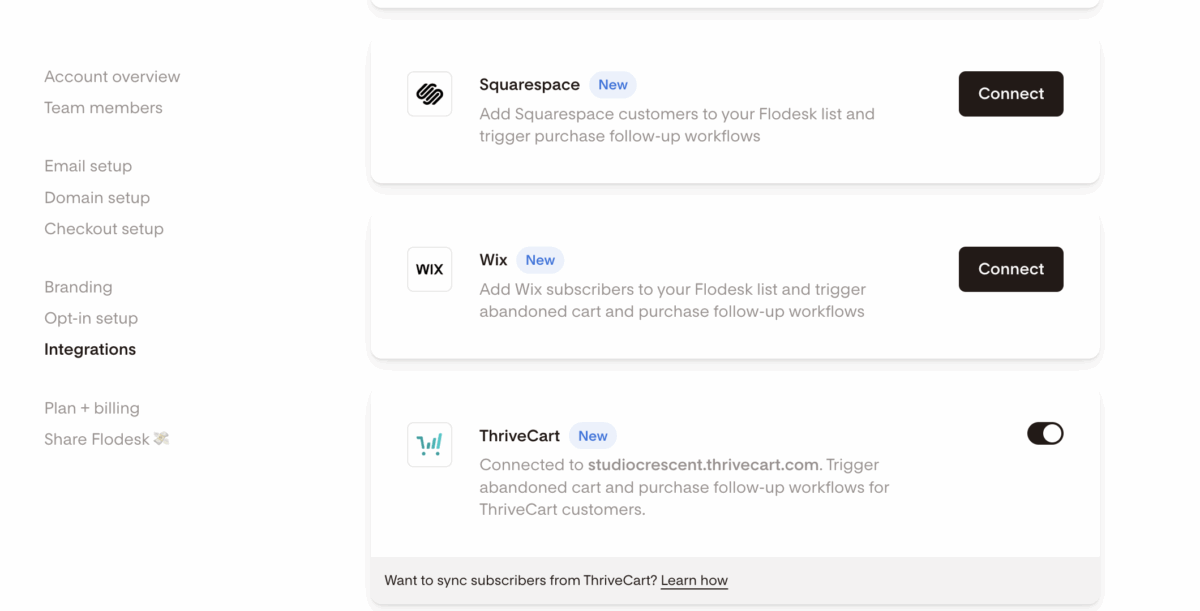
Step 1: Log onto your Flodesk account and go to Account settings > Integrations (Top Left)
Step 2: Find Thrivecart on the list, and click connect. A separate screen will pop up, prompting you to log onto Thrivecart, to allow for the integration
For more detailed instructions, click here.
On Thrivecart…
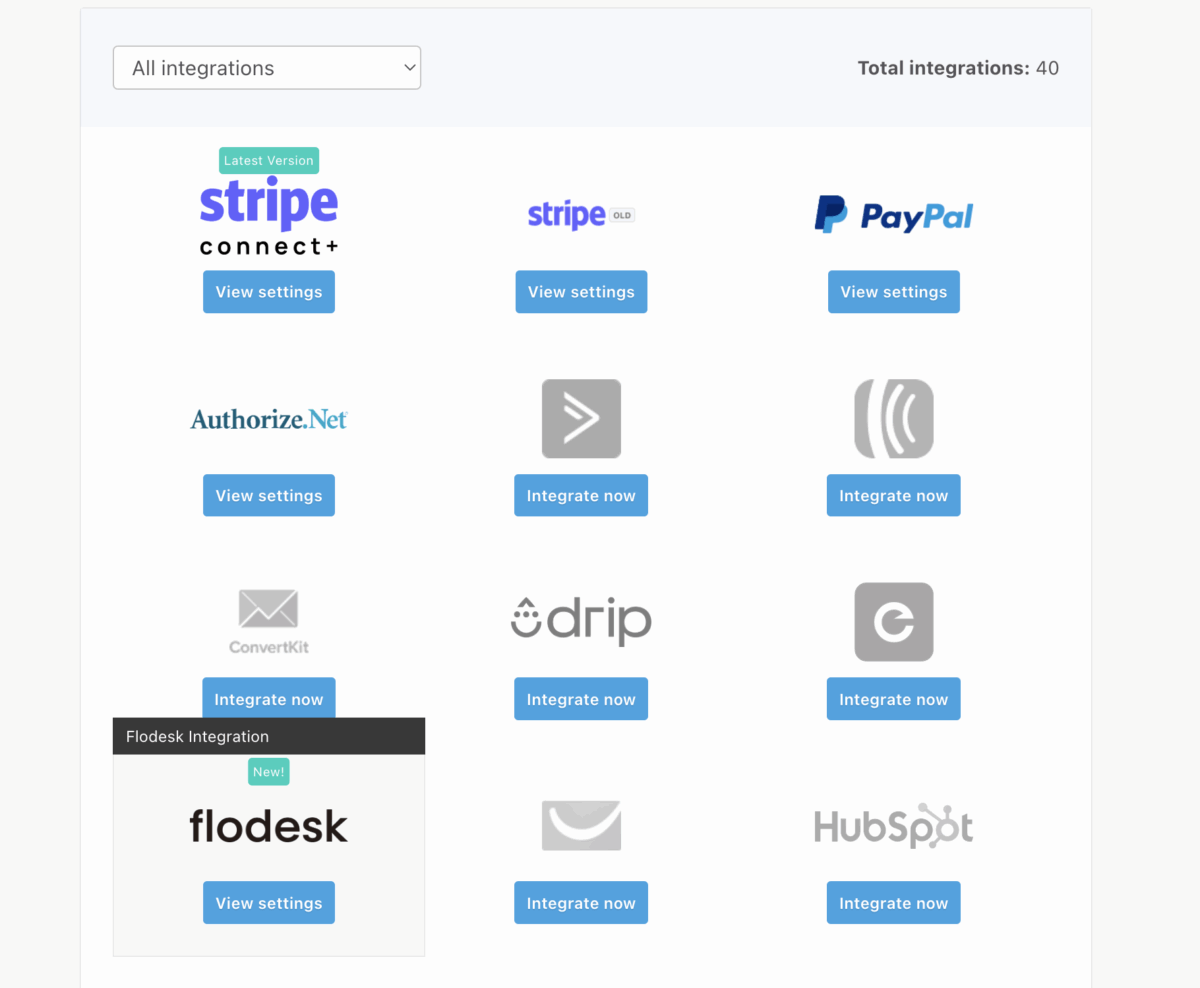
Step 1: Log onto your Thrivecart account (make sure you’re on the Pro plan) and go to Account settings > Integrations (Top Left where the button is)
Step 2: Find Flodesk on the list, and click “integrate now”. You’ll be directed to a separate page confirming the connection between the two.
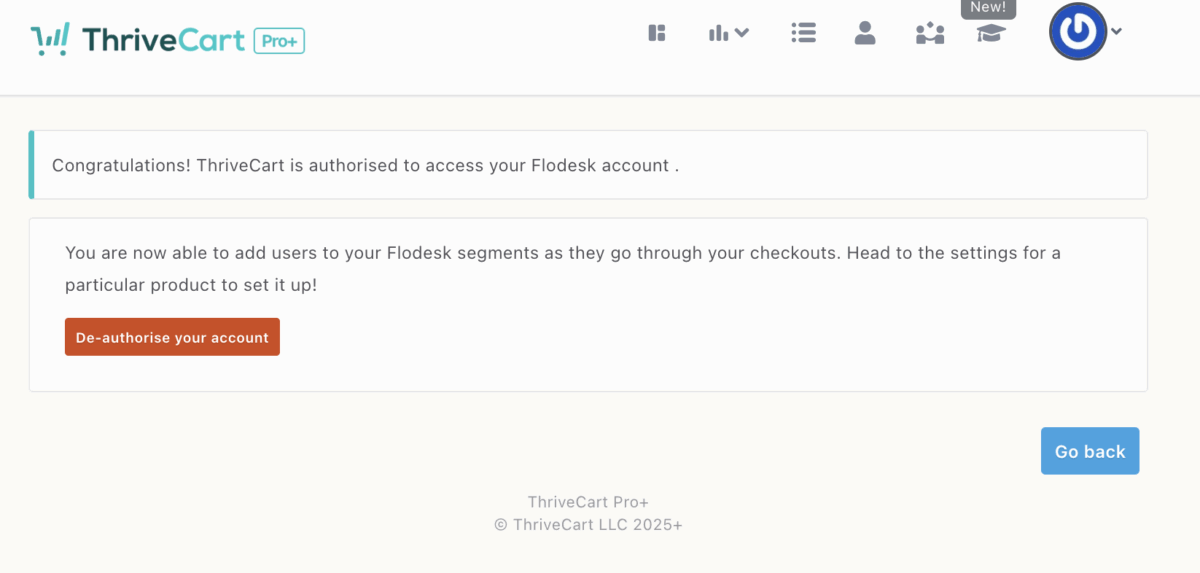
Step 3: Create a product listing and follow the prompts to create your checkout pages. If this is your first time, follow these instructions.
Step 4: Once the product is created and you’re at the “Automation” step, click on “add rule”. A pop-up will appear.
Step 5: The “When” corresponds to the workflow trigger. Select “Flodesk” under the Use dropdown, followed by the action you’d like to take, then click save. For example: When the main product is purchased, use Flodesk to add the customer to my website template sequence.
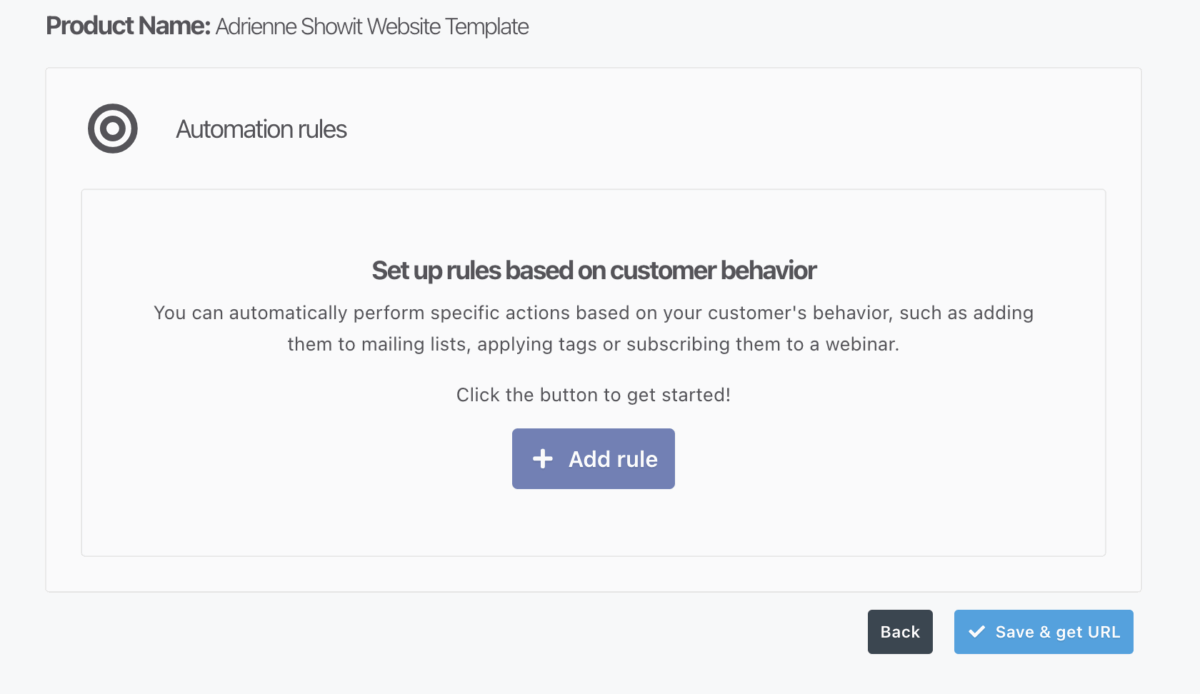
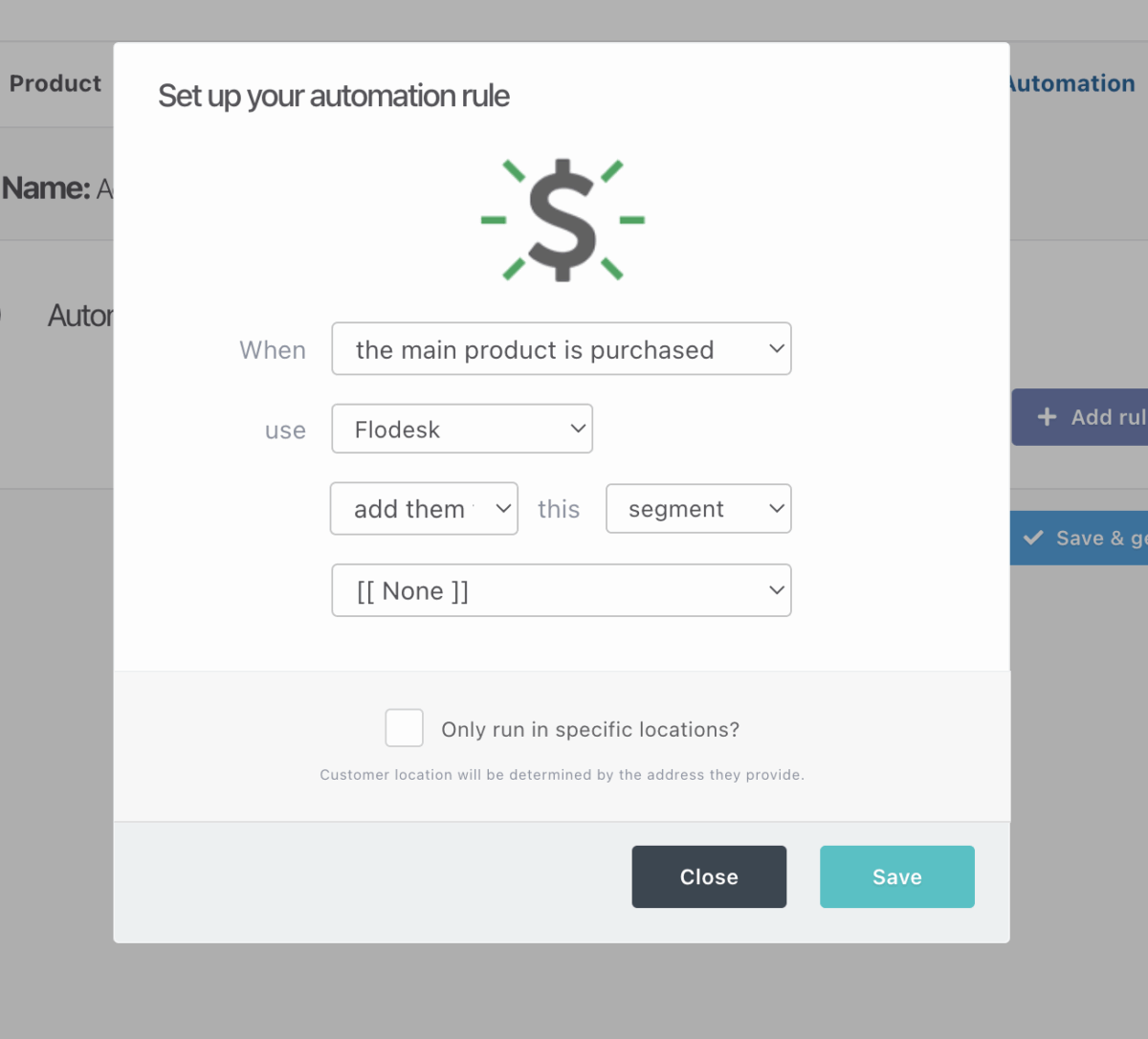
Now, every single time someone purchases a digital product, they are instantly added to the correct segment inside Flodesk, triggering the exact workflow you want!
Note: abandoned cart emails can only be triggered using Flodesk workflows.
What You Unlock With the Flodesk Thrivecart Integration
Once your Flodesk & Thrivecart Pro+ integration is connected, here’s what you can expect:
✔ Automatically add purchasers to the right segment
✔ Trigger product-specific workflows instantly
✔ Deliver downloads, tutorials, and onboarding without lifting a finger
✔ Remove another third-party platform entirely from your workflow (and saves you time from testing)
✔ Reduce tech issues and eliminate automation errors
✔ Provide a better customer experience with personalized email journeys
For small business owners selling digital products or website templates, this Thrivecart and Flodesk integration finally closes the loop between checkout → delivery → nurture. Woohoo 🎉

Should You Use Thrivecart or Flodesk Checkouts?
GREAT question to ask! Honestly speaking, both are incredible options; however, it just depends on your needs.
Use Thrivecart Pro+ if you:
- Sell multiple digital products
- Want affiliate management
- Need multiple upsells/downsells/order bumps
- Use advanced checkout logic
- Want to host courses inside Thrivecart Learn
- Need robust reporting and A/B testing
Use Flodesk Checkouts if you:
- Sell simple digital products
- Don’t need affiliates or multiple upsells
- Want an all-in-one email + checkout system
- Prefer a clean, minimal, (and even more) frictionless checkout
- Want everything managed in one platform
This integration brings simplicity and elevated customer experience back into your business… without sacrificing the quality of the tools you love.
If you’re looking for a way to simplify your backend, save time, and elevate how you sell your digital products, this integration now does the heavy lifting for me and is truly one of the easiest wins you can give your business! Whether you’re new to email marketing or a seasoned pro, I recommend giving Flodesk a try to see how easy it is to make this part of your marketing strategy. You can start a free trial and get 25% off your first year.
And if you want help mapping out your customer journey, designing your Flodesk email sequences, or building a high-converting workflow that feels as polished as your offer? I’d love to help you get it all set up in a way that feels stress-free and exciting, so you can finally focus on what you do best. Learn more about booking a VIP Design Day here.
Got any questions? Send me a DM on Instagram anytime – I love chatting tech stacks!
This post does contain affiliate links as I’m a Flodesk Partner, which means I may receive a commission for purchases made through these links, at no extra cost to you. Please know that I only promote products that I frequently use and wholeheartedly stand behind.
Paragraph
Calling all nutritionist coaches!
Meet The Full Sales Page Copy & Design Template Duo
Everything you need to finally launch your nutrition program with clarity, confidence, and personality. With copy fill-in-the-blanks, a drag-and-drop Showit template, and video walkthroughs, this is your done-with-overwhelm, ready-to-sell sales page template.

Shop Showit Website Templates
No Coding • Drag & drop • SEO optimized


Someday
Editorial, Edgy, Minimal
View demo

Joelle
Artistic, Striking, Refined
View demo


Beauté
Clean, Minimal, Refreshing
View demo


Designed By Yours Truly 🤍
